
Can we export the filtered dashboard rows as a CSV?
👀 101OPEN SOURCE / YOUR WORK, ASSEMBLED
Muster Agent: the open-source AI Development Environment (ADE)

A requirement.
A team. A reviewed change.
An open-source workspace for agents across chat, projects and code.
Follow one requirement all the way through.
An open-source AI Development Environment, made in India
Start with the conversationYOUR PROVIDERS. YOUR WORKSPACE.ONE REQUIREMENT. THE WHOLE STORY.
THE REQUIREMENT“Can we export the filtered
“Can we export the filtered
dashboard rows as a CSV?”
A teammate asks. A human tags Muster.
Now the work needs a plan, the right agents and a result worth reviewing.
02BRING MUSTER IN
The request is already in Slack.
A teammate asks for CSV export in #product-development. The conversation has context, but the work has no owner yet.
A human tags Muster, adds the constraints and gives the work a clear starting point.
WHAT YOU GET
The Slack thread stays the starting point. Muster picks up the work in its own project workspace.
NHomeDMsActivity
# product-development
Alex, Jamie and the product team
01 / 13
03GIVE THE WORK OWNERS
One request becomes a visible plan.
Implementation, testing and review need different kinds of work. A stack of prompts hides the dependencies.
CEO receives the requirement, delegates to CTO and Designer, and lets CTO hand validation to QA.
WHAT YOU GET
Open a task or profile to see progress, dependencies and the output being produced.
NHomeDMsActivity
# product-development
Alex, Jamie and the product team
01 / 13
04INSIDE THE AGENT
Context changes the next action.
“Export CSV” is not enough. The export must preserve filters and use the current dashboard columns.
The agent uses the project notes, its task and available tools to form a concrete patch.
WHAT YOU GET
Inspect the supporting context and the actions taken, rather than guessing from a spinner.
Local notes hold project decisions. Hindsight can add optional recall.
THE WORKSPACE IN MOTION
NHomeDMsActivity
# product-development
Alex, Jamie and the product team
01 / 13
05MAKE THE CHANGE CHECKABLE
A plausible patch can still be wrong.
An export that ignores active filters would pass a casual glance and fail the requirement.
Inspect the diff, run the check, expose the blocker and correct the row source.
WHAT YOU GET
The changed code and the test result become evidence for review.
NHomeDMsActivity
# product-development
Alex, Jamie and the product team
01 / 13
06WATCH THE RESULT
Use the browser. Inspect the change.
Passing code checks does not show what the user experiences.
The agent filters the dashboard, exports the CSV and checks its rows. The pull request opens in the right-hand pane.
WHAT YOU GET
The result, validation and review link stay visible together.
Desktop computer and browser tools make the result inspectable.
NHomeDMsActivity
# product-development
Alex, Jamie and the product team
01 / 13
07CLOSE THE LOOP
The conversation gets a useful answer.
The person who asked should not have to hunt through agent activity to find the result.
Muster replies in the original Slack thread with a concise summary and the pull-request link.
WHAT YOU GET
The user knows what changed, what was checked and what needs review.
NHomeDMsActivity
# product-development
Alex, Jamie and the product team
01 / 13
NHomeDMsActivity
# product-development
Alex, Jamie and the product team
01 / 13
SEETHE PRODUCT
The workspace
behind the story.
Projects, an agent Roster, task conversations, handoff memory, receipts and review are part of Muster’s current workbench.
Explore muster-code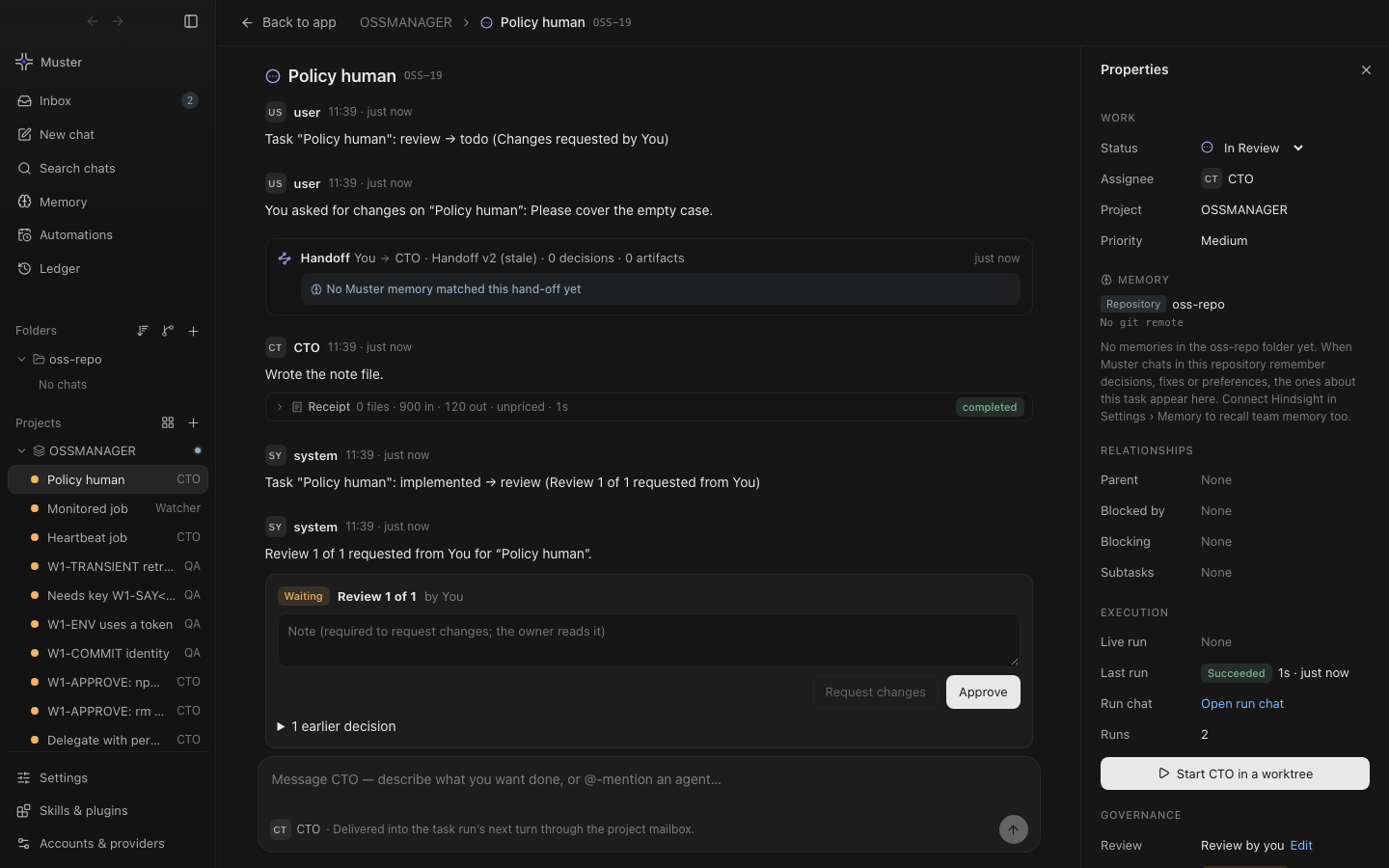
Work with Paperclip.
Link a server, inspect tasks and activity, use supported actions and import work into local projects. Imported history stays distinct from locally verified evidence.
Run an agent org locally.
The local server branch adds routed chat tasks and permission-controlled hierarchical delegation. Browser, terminal and computer tools remain desktop-only.
Keep the useful context.
Project and personal notes work locally. Hindsight is an optional integration. Existing provider and sign-in detection varies by engine.
Works with your routers.
OmniRoute (found locally, added as a provider or read from your Codex config, with your own key), OpenRouter, LiteLLM and any OpenAI-compatible gateway or custom endpoint such as vLLM or a company proxy, plus Ollama and LM Studio on your own machine. Muster lists whatever models your router or provider offers, so new models appear automatically. How routers work in the app
Models you can use.
OpenAI GPT via Codex or the API, Anthropic Claude via Claude Code or the API, Google Gemini via the Gemini CLI or the API, Meta Muse via the Meta Model API, xAI Grok via the Grok CLI, and DeepSeek, Qwen, Mistral, Kimi, GLM and Llama or other open-weight models through a router or run locally.
Paperclip and sandboxing.
Check a task out of a Paperclip org, work on it locally in a git worktree, and let the work hand itself back after a short countdown. Give a chat a scoped sandbox with no network by default, choose a permission mode from read-only to full access, and keep secrets out of the commands the agent runs. Paperclip tasks · Sandboxed agents
BEGINYOUR ENTRY POINT
Start where
the work happens.
Bring Muster to chat.
Configure the CLI gateway, an engine and a channel. Start with Slack Socket Mode or Telegram polling.
Set up messagingmusterhq/musterInspect the work on desktop.
Run the desktop app for projects, agent profiles, code review and computer tools.
Get desktop appmusterhq/muster-codeProduct paths and availability
The messaging gateway and desktop have distinct setups. Seven adapter paths have different readiness and response limits. The Code OSS IDE is a separate source-build offering. The local-server Wave 1 branch implements routed tasks and hierarchy delegation; the complete chat-to-browser-to-PR loop shown in the story is illustrative, and server task external-object PR creation is not yet built. The story does not connect accounts or create a real pull request.
Keep exploring.
Runtime, integrations & evidenceGuidesAgent harnessFrappe & ERPNextObserved edit evidenceComparisonsResume Codex sessionsDownloads & installationDesktop app for Codex, Claude Code and routersRun Claude Code and Codex in one appWork locally on Paperclip tasksAI coding agent with long-term memoryOmniRoute desktop clientSandboxed coding agentWhat is an AI Development Environment?Blog
Made in India
Codex, ChatGPT and OpenAI are trademarks of OpenAI; Claude and Claude Code are trademarks of Anthropic. Cursor is a trademark of Anysphere; Gemini and Google are trademarks of Google LLC. Meta and Muse are trademarks of Meta Platforms, Inc. xAI and Grok are trademarks of xAI; DeepSeek, Qwen (Alibaba), Mistral AI, Kimi (Moonshot AI), GLM (Zhipu AI), OpenRouter, LiteLLM, vLLM, Llama, Ollama, LM Studio and OmniRoute are trademarks of their respective owners. Muster Agent is an independent open-source project and is not affiliated with or endorsed by any of them.